

Nonprofit Website Checklist: What Should Your Website Include?
Help donors understand your impact, volunteers find their next step, and board members see the organization behind the mission.
Check Your Nonprofit WebsiteWhat should a nonprofit website include?
A nonprofit website should clearly explain its mission, who it serves, and how visitors can get involved. Include program information, evidence of impact, current leadership and contact details, and relevant ways to donate, volunteer, attend events, or apply for support. The website should work well on phones and be easy for your organization to maintain.
Before someone gives, joins your board, recommends your organization, or asks for help, your website may be their first introduction. That visit should make the next step clear.
A community organization may need prominent donation and volunteer options. A grantmaking foundation may need clear funding priorities, application guidance, and information about its history and leadership. Your website should reflect how your nonprofit actually operates.
Maryland Web Design Corporation has been building websites since 1999. Our work in nonprofit web design in Maryland includes the Herbert Bearman Foundation and Filbert Street Garden. This nonprofit website checklist brings together practical questions to ask before updating or redesigning your site.
Who is your nonprofit website supposed to help?
Your website should help each important audience find the information and action relevant to them. Donors, volunteers, grant applicants, board candidates, and people seeking services arrive with different questions.
| Visitor | Their question | What to provide |
|---|---|---|
| Donor | What will my contribution support? | Mission, documented impact, giving options, and a clear donation path. |
| Volunteer | How can I help? | Available roles, requirements, dates, and a simple inquiry or signup form. |
| Board candidate or sponsor | Who leads this organization? | Leadership, history, priorities, and current contact information. |
| Grant reviewer | What does this organization accomplish? | Programs, outcomes, reports, and relevant financial information. |
| Grant applicant | Does my organization qualify for funding? | Funding priorities, eligibility, deadlines, and application instructions. |
| Person seeking services | Can this organization help me? | Services, eligibility, location, hours, and how to get started. |
Use clear navigation labels such as “Apply for a Grant,” “Get Help,” “Volunteer,” or “Donate.” Choose the options that match your organization rather than giving every visitor the same generic “Learn More” button.
What should appear on a nonprofit homepage?
A nonprofit homepage should explain what the organization does, who benefits, and where its work takes place, followed by a clear next step. Visitors should understand the mission without reading several pages.
Replace broad statements such as “making a difference” with a specific explanation. A foundation might describe the causes and communities it supports. A service organization might explain who qualifies for help and how to request it.
- A direct headline explaining your purpose.
- A short introduction with your location or service area.
- A real photo that supports the mission.
- Clear links to your main programs or funding priorities.
- A primary action appropriate to your nonprofit.
Try this: Show the homepage to someone outside your organization for five seconds. Ask what your nonprofit does and what they would click next.
How can your website make donating easier?
For nonprofits that accept public donations, make giving easy to find, explain what contributions support, and keep the donation process straightforward. Test the experience from the first click through the confirmation.
- Use a consistent, clearly labeled donation link.
- Explain how gifts support your work using accurate examples.
- Ask only for information needed to process the gift.
- Offer recurring giving when appropriate and supported.
- Make any transfer to an outside donation platform clear.
- Confirm that the donor receives the expected acknowledgment.
If your foundation does not solicit public donations, use that space for its real priority, such as explaining grantmaking, introducing supported initiatives, or helping qualified applicants.
Try this: Complete a small authorized test donation on your phone. Check the payment, confirmation screen, acknowledgment email, and notification to your team.
What builds trust in a nonprofit website?
Specific, verifiable information builds trust. Show what your organization does through real program photos, documented outcomes, current reports, and stories shared with permission.
Explain the context behind your numbers. “We served 200 families” becomes more useful when readers know which program, what support was provided, and the reporting period.
For a foundation, impact may include supported organizations, funded initiatives, or grantmaking priorities. Use examples you have permission to publish and avoid implying outcomes you have not measured.
Should a nonprofit website include video?
Short videos can introduce a founder, explain a program, highlight a volunteer, or show an event. Add captions and a useful written summary so visitors can understand the content without sound.
Connect each video to a relevant page. An event video can lead to registration; a program story can lead to program details or giving. Our social media and video services can support planning, filming, editing, and ongoing posting.
How should nonprofits organize programs, events, and applications?
Give each major program or participation opportunity a clear page with practical instructions. Explain who it is for, what happens next, and how to contact the right person.
Volunteer pages should describe roles, time commitments, requirements, and signup steps. Event pages should include dates, locations, registration details, and any participation costs.
Grantmaking foundations should explain funding priorities, eligibility, application periods, required materials, and whether unsolicited applications are accepted. Remove expired deadlines or label past funding cycles clearly.
Try this: Ask someone unfamiliar with the website to find an opportunity and explain how to participate. Notice where they hesitate.
What should board members and grant reviewers be able to find?
Make your leadership, history, programs, and relevant accountability information easy to locate. These details help visitors understand the organization and assess whether it aligns with their goals.
- Current board and leadership information.
- Your organization’s history and purpose.
- Annual reports or impact summaries, when available.
- Relevant financial documents or transparency profile links.
- A working contact method for appropriate inquiries.
Share public contact information appropriate to your organization. Avoid publishing private home addresses or personal contact details simply to fill a template.
What makes a nonprofit website easier to use on a phone?
Readable text, clear navigation, comfortable buttons, and simple forms make the main tasks easier on smaller screens. Test actual activities instead of checking only how the homepage looks.
- Read a program page without zooming.
- Open and use the mobile menu.
- Submit an inquiry or volunteer form.
- Complete a donation or registration when relevant.
- Find application guidance and contact information.
Accessibility also belongs in nonprofit website planning. Use descriptive headings, labeled form fields, meaningful image descriptions, visible keyboard focus, readable contrast, and captions for videos. Check that important tasks work with a keyboard.
Who should control a nonprofit’s domain, website, and hosting?
The organization should retain control of its domain, website access, and key service accounts, with documented arrangements for any vendor-managed services. Access should survive changes in staff, volunteers, and board members.
- Record the domain registrar, renewal date, and authorized contacts.
- Use organization-controlled recovery email addresses.
- Document hosting responsibilities and support contacts.
- Keep appropriate administrator access and secure account recovery.
- Confirm that backups exist and can be restored.
- Assign responsibility for updates and security maintenance.
Your team should also know how to update routine content or request help. An event announcement should not depend on locating a former volunteer who left several years ago.
How can nonprofit SEO help people find your organization?
Nonprofit SEO helps connect your website with searches about the causes, services, funding, and opportunities you provide. Start with useful pages that clearly explain each program and its location or service area.
Someone may search for volunteer opportunities in Baltimore, community programs in Maryland, or foundation funding priorities. Your content should answer the questions relevant to your actual work.
- Use descriptive page titles and question-based headings.
- Explain eligibility, service areas, and next steps in plain language.
- Keep important information available as readable webpage text.
- Link related programs, reports, and application pages.
- Keep contact details and organizational information consistent.
Clear answers also make your information easier to interpret. They do not guarantee inclusion in AI-generated answers. Learn about our approach to AI-first SEO and structuring useful website content.
What does nonprofit website design look like in practice?
The right nonprofit website design follows the organization’s mission and audiences. These two Maryland projects show how different nonprofit needs shape the website.
Herbert Bearman Foundation

The Herbert Bearman Foundation project focused on a polished presentation, clearer mission and history content, improved page organization, and domain recovery support.
It illustrates how a foundation website can communicate its purpose and established identity while supporting long-term website management and search visibility.
Explore the Herbert Bearman Foundation case studyFilbert Street Garden
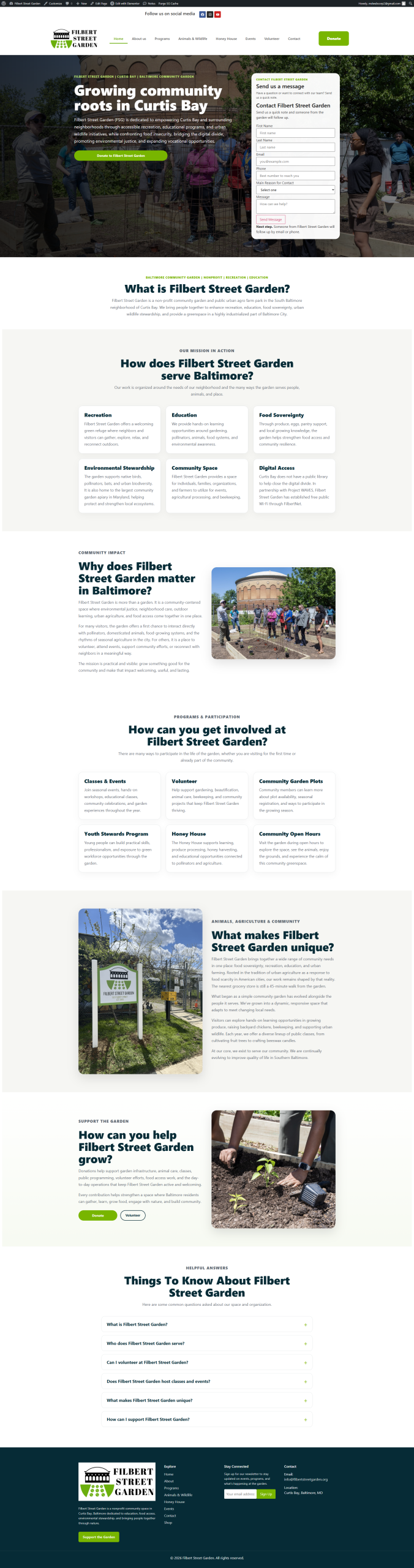
Filbert Street Garden serves Curtis Bay and the Baltimore community. Its website